Biocals
Sleep studies open with biocalibrations: scripted participant actions (eyes open, eyes closed, look left/right, and so on) whose known physiological signatures verify the recording channels. The Biocals window (in the Panels column) runs them as timed, marked events — every standard biocal plus the common lucid-dreaming signal practices (LRLR variants, fist clenches, sniffs), each on its own row.
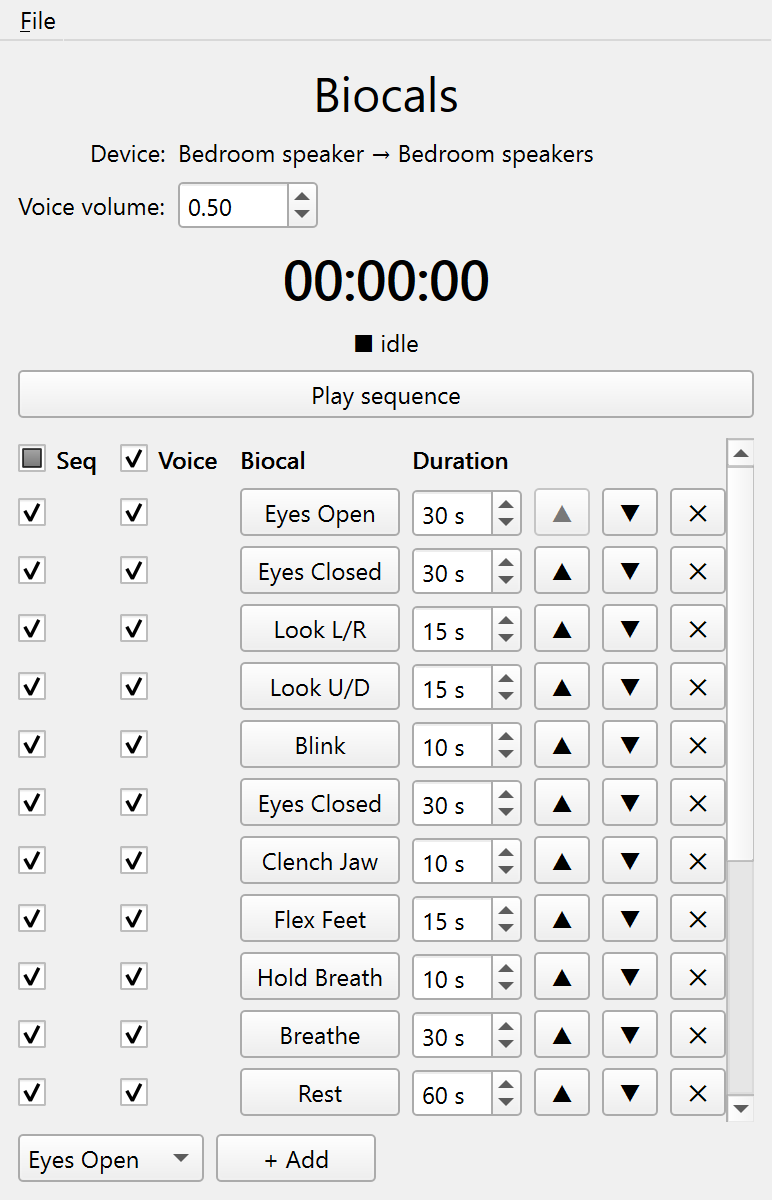
Running a biocal
Each row has a toggle button, two checkboxes, and a duration:
- The biocal’s button runs it. The button stays depressed while it runs and the countdown at the top shows the time remaining in its task window. Press it again to cancel early, so a botched 30-second window need not be waited out.
- Voice speaks the pre-recorded instruction (for example, “Please close your eyes and relax for thirty seconds.”) over the cue output when the biocal starts. Leave it unchecked to give the instruction yourself.
- Seq includes the row when Play sequence runs the whole stack in order. Standard biocals start checked; the lucid-dreaming ones start unchecked.
- Duration is the task window in seconds. With the voice on, the window (and its countdown) starts when the instruction ends, so a 10-second breath hold is a full 10 seconds. This matches the manual practice of speaking first, then marking when the participant complies.
Sequences
Play sequence runs every Seq-checked row top to bottom, depressing each button as it goes. Pressing the active biocal’s button skips that item (a cancel marker, then on to the next); pressing the sequence button again aborts the rest. Rows can repeat a biocal (eyes-closed twice, extra LRLRs — use + Add for another instance), be reordered with ▲/▼, and removed with ✕. The stack is locked while something is running. For a biocal SMACC does not ship, use a custom event button in the Event logging panel.
Markers
Each biocal’s start code fires when its task window opens. A shared completed code fires when the window runs out, and a shared cancelled code fires on an early stop (the preceding start code identifies which biocal). A played sequence is bracketed by its own start/stop codes and otherwise fires the same per-biocal markers. The defaults are sequence start/stop 105/106, cancelled 107, completed 108, and one start code per biocal in the 110–126 band. All are retunable in the Markers window like any built-in event (see Markers & port codes).
Voice recordings
Voice recordings ship inside SMACC (generated with ElevenLabs text-to-speech) and are read straight from the bundle, so they stay current when you upgrade. To use another voice or language, drop your own recording under the same name in your SMACC directory’s biocals/ folder (for example ~/SMACC/biocals/); a file there overrides the bundled one. A biocal with no recording in either place still runs, just unvoiced, and session start warns when that happens.
The shared Voice volume rides the cue route, so the master output cap and the control-room monitor fan-out apply to instructions exactly as they do to cues (see Volume & latency and Audio routing).