Visual cues
Light is SMACC’s second cueing modality, and it earns its place for two reasons. Closed eyelids still transmit light, so a lamp can reach a sleeping (or dreaming) participant directly; flashing light during REM is the classic lucidity-induction signal. And light is silent, so it layers over masking noise or an auditory protocol without touching the soundscape. SMACC drives light cues on a USB BlinkStick or on Philips Hue bulbs, from one window, with the same marker discipline as audio.
This page covers the Visual cue board, the patterns, what the markers mean, choosing between the two devices, and the safety notes that come with flashing light at sleeping people. For plugging the devices in and binding them, see Devices.
The visual cue board
The Visual cue window (in the Panels column) is the light sibling of the Audio cue board: one row per cue, each kept configured and ready so that firing the right light at 3 a.m. is a single click.
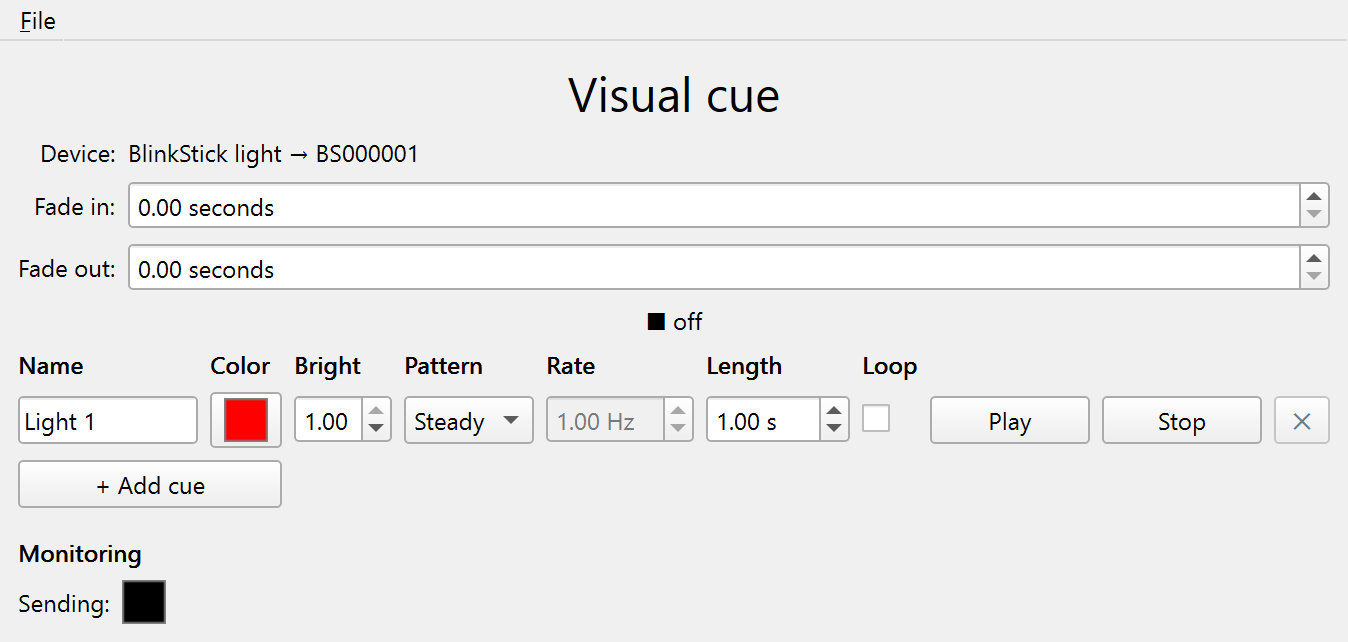
Each row holds a name (it travels into the event log with every start/stop marker), a color, a brightness (0–1 — the visual volume), a pattern with its rate, a length in seconds, and a loop checkbox that keeps the cue going until you press its Stop. Use + Add cue and each row’s ✕ to match the protocol (one cue minimum, up to 10).
Above the table, two shared fades shape every cue: Fade in ramps brightness up at the start, and Fade out ramps it down — both when you stop a cue early and when its length runs out, so a cue never cuts to black abruptly unless you want it to (leave the fades at 0 for crisp edges).
Playback is one light at a time: playing a row stops whatever else is lit (and marks its stop); re-playing the lit row just restarts it. While a cue is lit, its brightness and loop edits take effect immediately; color, pattern, rate, and length apply from the next Play.
The Sending swatch at the bottom shows the exact color SMACC is pushing to the device, frame by frame — the visual counterpart of the audio board’s Sending meter. The same caveat applies: it confirms SMACC is emitting, not that the bedroom light actually lit. A BlinkStick has no return channel, so if you need proof, that’s what the bedroom camera (or your own eyes) is for.
Patterns
- Steady — constant light for the length. With a long fade-in this is also the ambient/dawn workhorse (see Recipes).
- Pulse — a smooth brightness wave at the chosen rate (it starts dark and peaks mid-cycle, so onset is gentle). The usual choice for a salient-but-sleep-friendly cue.
- Flash — full on/off at the chosen rate (half on, half off). Maximal salience; the classic photic stimulus. BlinkStick only — see the comparison and Safety.
The rate is set in Hz, the unit your methods section wants. The fades stay separate from the pattern: the pattern is the stimulus, and the fades only shape how it ramps in and out. Pattern timing is computed from elapsed time rather than accumulated per frame, so a busy GUI moment can’t drift the flicker.
What the markers mean
Every play and stop is marked in the log and on the trigger channel with the VisualStarted (66) and VisualStopped (68) events, each carrying the cue’s name. Two details matter for analysis:
VisualStartedfires after the first frame is committed to the device. On a BlinkStick the USB write takes ~1–2 ms, so the marker trails the photons by about that much. On Hue, “committed” means the bridge accepted the command — the bulb itself transitions over the following ~100 ms, so the marker leads the photons by that lag (and it varies). Time-locked analyses should use the BlinkStick.VisualStoppedfires once the light is actually dark — after the fade-out completes, not when Stop is pressed. The pair brackets the physical stimulus, not the button presses.
Every stop path turns the light off — Stop, the length running out, switching to another cue, a device failure, or quitting SMACC — so a cue can’t be left burning over a sleeping participant.
BlinkStick or Philips Hue?
| BlinkStick | Philips Hue | |
|---|---|---|
| What it is | A USB stick/strip of RGB LEDs | Ordinary smart bulbs + a bridge |
| Connection | One USB cable, no network | Bridge on the rig’s LAN; bulbs via Zigbee |
| Buying | blinkstick.com only | Retail everywhere, but pricier |
| Setup | Plug in, bind, done | Pair once with the bridge’s link button (Devices › Philips Hue) |
| Cue onset | ~1–2 ms after the marker | ~100 ms of lag and jitter |
| Patterns | Steady, plus pulse and flash up to 20 Hz | Steady and slow pulse; flash is refused (the bridge rate-limits commands far below a square wave) |
| Coverage | A point source near the bed | Whole-room illumination, or a group of rooms |
| Fails when | The USB cable/port acts up | The bridge IP changes or the network drops |
Rules of thumb: for time-locked cueing (EEG-aligned onsets, flicker at a defined Hz) use the BlinkStick. For ambient light — dawn simulation, whole-room color, slow breathing pulses — Hue is the better lamp. A rig can bind both and switch by re-routing Play visual cue in the Devices window.
The bridge and the control PC must reach each other on the same network, and institutional Wi-Fi often blocks exactly that (client isolation, registration portals). The dependable setup is a small dedicated router (or an Ethernet drop) for the rig’s gear — and a DHCP reservation for the bridge, so its IP stops changing. The pairing key is stored in the study’s .smacc file; it only works from the local network, but treat the file accordingly.
Safety
Flicker between roughly 3 and 30 Hz can trigger seizures in photosensitive individuals, with peak sensitivity around 15–25 Hz. SMACC shows a warning on the board whenever any pulse/flash rate is set above 10 Hz and caps the control at 20 Hz — above that the USB timing couldn’t deliver a faithful square wave anyway. Screen participants for photosensitivity and a seizure history before using flicker, and keep rates at or below 10 Hz unless the protocol specifically demands more.
For the sleeping side of the equation: the default cue color is red on purpose — melatonin suppression and arousal are driven mostly by short (blue) wavelengths, so red light is the gentlest way to be visible, which is also why it is the darkroom convention. Treat brightness like cue volume (start low and calibrate on a pilot night), and give cues a fade-in so they ramp rather than startle. An abrupt bright flash is how you buy an awakening and lose the data point.
Recipes
- A TLR-style lucidity cue — red, brightness ~0.2, pulse at 1 Hz, length 10 s, fade in/out ~1 s. Salient enough to penetrate REM, gentle enough to keep it.
- Dawn simulation — warm white, steady, length 300 s, fade in 60 s, on a Hue group: the room brightens like a sunrise for a gentler scheduled awakening.
- Cue vs. sham — two identical rows, the sham at brightness 0. The sham fires real
VisualStarted/VisualStoppedmarkers with zero light, so the trigger channel shows both conditions while only one stimulates.
Known limitations
- A BlinkStick’s LEDs all show one color at a time — per-LED patterns are a documented non-goal (#11, closed as documented).
- One light at a time: cues are one-at-a-time on one routed device; SMACC does not fire a BlinkStick and a Hue simultaneously.
- No flash on Hue, and Hue onsets lag their markers — see the comparison.
Troubleshooting
- The BlinkStick isn’t listed — replug it and press
F5(or click Refresh devices in the Devices window). The driver ships inside SMACC; nothing to install. - “No light is set.” — bind the device in the Devices window and check that Play visual cue is routed to that light.
- The Hue bridge stopped responding — its IP probably changed; re-enter it in Set up Philips Hue… (and give the bridge a DHCP reservation so it stays put). If pairing fails from lab Wi-Fi, see the network note above.
- A light stayed on — SMACC turns lights off on every stop and on quit, so a stuck light means the app was killed mid-cue or the device dropped: replug the stick, or power-cycle the bulb (or toggle it in the Hue app).